
SQL-specific requests and responses
Below are considered the IPROTO_EXECUTE and IPROTO_PREPARE requests, followed by a description of responses.
Name | Code | Description |
|---|---|---|
0x0b | Execute an SQL statement (box.execute()) | |
0x0d | Prepare an SQL statement (box.prepare()) |
Code: 0x0b.
The body is a 3-item map:

- Use IPROTO_STMT_ID (0x43) and statement-id (MP_INT) if executing a prepared statement. Use IPROTO_SQL_TEXT (0x40) and statement-text (MP_STR) if executing an SQL string.
- IPROTO_SQL_BIND (0x41) corresponds to the array of parameter values to match ? placeholders or :name placeholders.
- IPROTO_OPTIONS (0x2b) corresponds to the array of options. It is usually empty.
Suppose we prepare a statement with two ? placeholders, and execute with two parameters, thus:
n = conn:prepare([[VALUES (?, ?);]])conn:execute(n.stmt_id, {1,'a'})
Then the body will look like this:
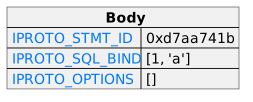
The Understanding binary protocol tutorial shows actual byte codes of the IPROTO_EXECUTE message.
To call a prepared statement with named parameters from a connector pass
the parameters within an array of maps. A client should wrap each
element into a map, where the key holds a name of the parameter (with a
colon) and the value holds an actual value. So, to bind foo and bar to
42 and 43, a client should send
IPROTO_SQL_TEXT: <...>, IPROTO_SQL_BIND: [{"foo": 42}, {"bar": 43}].
If a statement has both named and non-named parameters, wrap only named ones into a map. The rest of the parameters are positional and will be substituted in order.
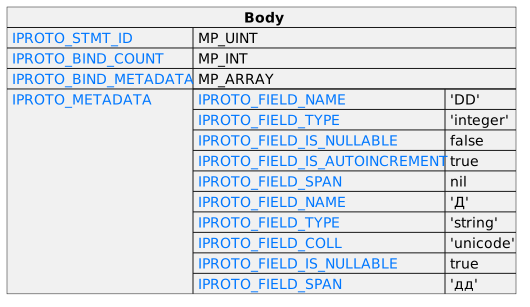
Let's ask for full metadata and then select the two rows from a table named t1 that has columns named DD and Д:
conn.space._session_settings:update('sql_full_metadata', {{'=', 'value', true}})conn:prepare([[SELECT dd, дд AS д FROM t1;]])
In the iproto request, there would be no IPROTO_DATA and there would be two additional items:
34 00 = IPROTO_BIND_COUNT and MP_UINT = 0(there are no parameters to bind).33 90 = IPROTO_BIND_METADATA and MP_ARRAY, size 0(there are no parameters to bind).
Here is what the request body looks like:
Code: 0x0d.
The body is a 1-item map:
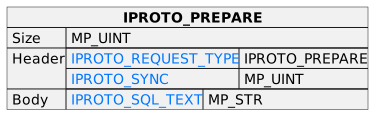
The IPROTO_PREPARE map item is the same as the first item of the IPROTO_EXECUTE body for an SQL string.
After the header, for a response to an SQL statement, there will be a body that is slightly different from the body for non-SQL requests/responses.
If the SQL statement is SELECT or VALUES or PRAGMA, the response contains:
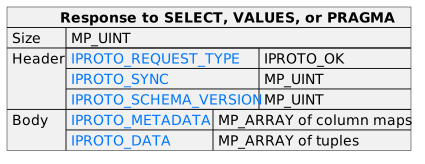
Let's ask for full metadata and then select the two rows from a table named t1 that has columns named DD and Д:
conn.space._session_settings:update('sql_full_metadata', {{'=', 'value', true}})conn:execute([[SELECT dd, дд AS д FROM t1;]])
The response body might look like this:
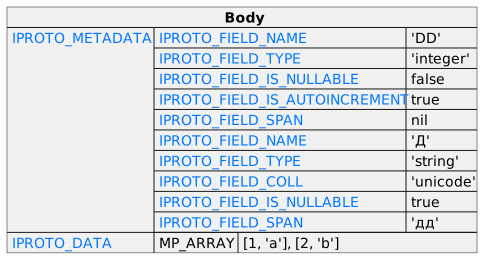
The tutorial Understanding the binary protocol shows actual byte codes of responses to the above SQL messages.
If the SQL request is not SELECT or VALUES or PRAGMA, then the response body contains only IPROTO_SQL_INFO (0x42). Usually IPROTO_SQL_INFO is a map with only one item – SQL_INFO_ROW_COUNT (0x00) – which is the number of changed rows.
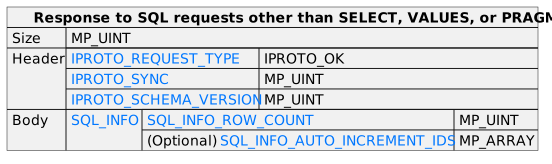
For example, if the request is
INSERT INTO {table-name} VALUES (1), (2), (3), then the response body contains an
IPROTO_SQL_INFO map with
SQL_INFO_ROW_COUNT = 3.
The IPROTO_SQL_INFO map may contain a second item –
SQL_INFO_AUTO_INCREMENT_IDS (0x01) –
which is the new primary-key value (or values) for an INSERT in a table
defined with PRIMARY KEY AUTOINCREMENT. In this case the MP_MAP will
have two keys, and one of the two keys will be 0x01:
SQL_INFO_AUTO_INCREMENT_IDS, which is an array of unsigned integers.